
In the latest versions of Windows 11, the driver which we had been providing for the Panorama P-series is being blocked by Microsoft Driver Signature Enforcement. Because of this issue, it will be necessary to use the Panorama P-series as a Class Compliant device in Windows. As a result, the QWERTY Macro functions will no longer be supported.
For most customers this will be a two step process: Uninstall the driver, then Update the firmware.
- Navigate to C:\Program Files\Nektar\P* (where * represents 1, 4 or 6, depending on which P-series model you have), then double-click on 'uninstall.exe'. Follow the prompts to uninstall the P-series driver.
- Download the latest DAW support package from the 'My Account' page, then update the firmware to version 03.14.03, according to the instructions on this page: https://support.nektartech.com/updating-firmware-and-getting-started-panorama-p-series/
If you are using Cubase/Nuendo, Fender Studio Pro/Studio One, Reaper, Bitwig, FL Studio or Nektarine, your DAW software should detect your P-series controller again, without any additional configuration.
Reason users: Re-install after removing the driver.
If you are using Reason, you will also need to reinstall the Reason support software. Download the installer package on the ‘My Account’ page of the Nektar website. The package also contain the firmware version you need (v03.13.14). After downloading the file you need, please follow these steps:
Run the installer called Panorama_Reason_Support_WIN_1.8.3.exe
You will encounter the following message:
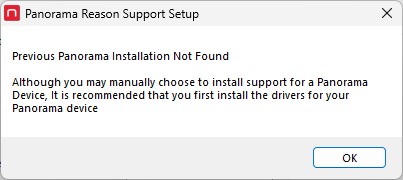
This appears because the driver is not present. Just click 'OK'.
Because the installer doesn't see the driver's for the P1, P4 or P6, the options to install for those devices are unticked by default, as shown below.
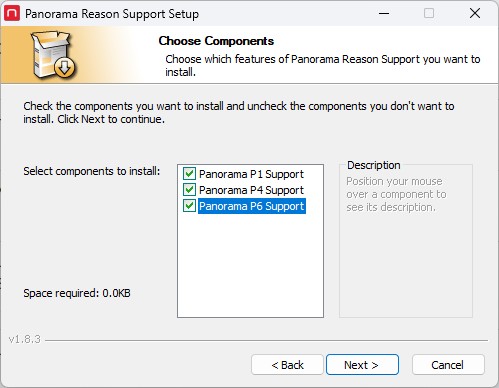
Once the installation is complete, Reason should detect the P-series controller as it did previously.


